How I Use ChatGPT to Build Websites in 2026: My Real Workflow
My practical ChatGPT website workflow in 2026: planning, structure, content, design handoff, coding, review, deployment, and SEO — without asking AI to decide everything.

When I first started using ChatGPT for website work, I thought the obvious goal was to make it build more of the website for me.
Write the copy.
Generate the code.
Fix the bugs.
Suggest the design.
Do the SEO.
The more I used it on real projects, the more I realised that was not the most useful way to think about it.
Today, ChatGPT is still one of the most important tools in my website workflow.
But its most valuable role is not replacing every other tool.
It is helping me make better decisions before, during, and after the build.
My current process is closer to:
Idea → ChatGPT planning → structure → v0 → Cursor → GitHub → Supabase when needed → Vercel → Search Console
ChatGPT sits across the workflow, but I give it a different job at each stage.
That distinction has made the biggest difference.
Quick answer: how I use ChatGPT to build websites
I use ChatGPT for seven main jobs:
- Clarify what the website is actually supposed to achieve.
- Turn rough ideas into a page and feature structure.
- Define content, user journeys, constraints, and priorities.
- Prepare a clear brief before I use v0 or start changing code.
- Help me understand technical problems before I edit the project.
- Review the result against the original goal.
- Analyze Search Console and real user signals after launch.
I do not ask ChatGPT to make every product, design, security, or business decision for me.
The workflow works better when AI helps me think clearly instead of forcing me to accept whatever it generates first.
The biggest change: I stopped starting with code
My early prompts often jumped straight to the output.
Build me a website.
Create a homepage.
Fix this login.
Make this page more professional.
Those prompts can produce something quickly.
They can also create a lot of unnecessary work.
A website is not just a collection of sections and components.
Before the code matters, I need to know:
- who the site is for
- what problem it solves
- what the visitor should do
- what information they need first
- which pages actually matter
- what the project must not become
- which features are essential
- which features can wait
When those decisions are unclear, AI usually gives me more options.
When those decisions are clear, AI gives me leverage.
That is why I now start with planning.
Step 1: define the website before asking for a website
The first thing I ask ChatGPT to help with is not the design.
It is the brief.
A useful starting conversation usually covers five questions:
1. Who is this for?
Not:
Everyone.
More like:
Small-business owners who need a clear service website and are likely to visit on mobile.
Or:
Parents who need school information quickly and may not be comfortable with complicated navigation.
The more specific the audience becomes, the easier the rest of the site becomes.
2. What should the visitor do?
A website should usually have one primary action.
Examples:
- book
- call
- enquire
- buy
- register
- compare
- read
- download
If I cannot explain the primary action, I am usually not ready to design the page.
3. What information is required before that action feels reasonable?
This is where ChatGPT is particularly useful.
I can give it the audience and desired action, then ask:
What questions would this visitor need answered before they feel comfortable taking the next step?
That helps me find missing trust signals, unclear services, confusing terminology, or weak page order.
4. What pages are actually needed?
I try to build the smallest useful site first.
ChatGPT can help separate:
Required now
from:
Maybe later
That prevents a five-page project from becoming a fifteen-page project before the first version is even live.
5. What should not change?
Constraints are one of the most underrated parts of AI work.
Examples:
Keep one primary CTA.
Do not add a pricing page.
Do not introduce user accounts in the first release.
Preserve the existing brand.
Mobile clarity matters more than decorative effects.
A boundary can be more useful than another idea.
Step 2: turn the brief into information architecture
Once the goal is clear, I use ChatGPT to organize the site.
That usually means:
- navigation
- page hierarchy
- homepage sections
- service or product grouping
- user journey
- content priority
- internal links
- possible future pages
A typical prompt might be:
This website is for [audience]. The primary action is [action]. These are the services and trust signals we have. Propose the smallest page structure that explains the offer clearly. Do not add pages unless they solve a specific user need.
I do not treat the first answer as final.
I use it as a working model.
Then I ask:
Which page is unnecessary?
What can be combined?
Where would a first-time visitor get confused?
What information appears too late?
Those questions often improve the site more than asking for another design.
Step 3: use ChatGPT to prepare the design brief, not replace the design process
Once the structure is stable, I move toward interface design.
This is where v0 often enters my workflow.
But I try not to send v0 a vague request like:
Make a modern website.
Before I do that, I use ChatGPT to turn the planning into a compact design brief.
A useful brief includes:
Purpose
Help visitors understand the service and request a consultation.
Audience
Non-technical small-business owners, many on mobile.
Required sections
Hero, problem, services, process, proof, FAQ, final CTA.
Primary action
Request a consultation.
Constraints
One primary CTA. No pricing. No extra sections. Keep the visual hierarchy simple.
Visual direction
Clean, calm, credible, readable, and more practical than promotional.
That is the point where an AI design tool becomes much more useful.
I explain the next stage in How to Use v0 Without Wasting Credits in 2026.
Step 4: separate planning from implementation
This is one of the most important parts of my workflow.
ChatGPT and Cursor overlap.
Both can explain code.
Both can generate code.
Both can debug.
But I still give them different jobs.
For me:
ChatGPT helps me reason across the project.
Cursor helps me work inside the actual codebase.
Before I ask Cursor to make a change, I often use ChatGPT to clarify:
- what is actually broken
- which layer might be responsible
- what should happen instead
- what should remain unchanged
- how I will test the fix
Then the implementation prompt becomes much narrower.
For example, instead of:
Fix the login.
I can move into Cursor with something closer to:
Login succeeds in Production but fails in Preview. Keep the existing UI and database schema. First trace the environment and redirect configuration. Make the smallest change required and do not change RLS policies.
That is a much better engineering brief.
My practical Cursor process is documented in How to Use Cursor for Website Development in 2026.
Step 5: ask AI to identify the layer before changing the code
One of the most expensive mistakes I made was assuming every website problem was a code problem.
It is not.
A failure can come from:
- code
- environment variables
- authentication redirects
- deployment configuration
- database permissions
- stale builds
- DNS
- browser state
- content
- SEO
- user expectations
So before changing code, I often ask ChatGPT:
Which layer is most likely failing?
Then I separate the possibilities.
For a deployment issue, that might become:
- Does the same commit work locally?
- Does it work in Production?
- Does it fail only in Preview?
- Are the environment variables scoped differently?
- Is the deployment old?
- Is authentication returning to the wrong domain?
This way of thinking led to several of the Vercel troubleshooting guides on this site.
The important lesson was not the specific error.
It was the habit of diagnosing the layer before editing the project.
Step 6: keep context instead of restarting the conversation every time
Longer website projects become difficult when every conversation starts from zero.
The project has history.
There are decisions I already made.
There are things I deliberately rejected.
There are naming conventions, design rules, content priorities, and technical constraints.
For ongoing work, I keep related chats, source material, and project instructions together so the next decision can use the existing context instead of rebuilding it.
OpenAI's current ChatGPT Projects documentation describes the same basic benefit: related chats, files, and instructions can stay together so ChatGPT can work with shared project context over time.
That matters because consistency is one of the hardest parts of AI-assisted work.
Without context, AI can give me a perfectly reasonable answer that is wrong for the project I am actually building.
Step 7: review the output against the original goal
AI makes it easy to judge a result by how impressive it looks.
I try to judge it by whether it solved the original problem.
For every important page, I come back to questions like:
- Can a new visitor understand what this is quickly?
- Is the primary action obvious?
- Is anything competing with that action?
- Does the content answer the real questions?
- Does mobile still work?
- Did the implementation add complexity that was not required?
- Are trust signals clear?
- Is the site faster to understand than before?
If the answer is no, another AI-generated section is usually not the solution.
Sometimes the best improvement is removing something.
Step 8: use GitHub as the point of control
AI makes changes fast.
That is exactly why I want a strong record of what changed.
GitHub gives me:
- commits
- branches
- diffs
- pull requests
- rollback points
- a clean separation between testing and Production
My preferred pattern is:
Plan → small change → review → Preview → merge → Production verification
This matters more as AI gets better.
A tool that can change ten files quickly also needs a workflow that makes those ten changes understandable.
GitHub is not just a developer habit for me anymore.
It is the safety layer that makes AI-assisted development practical.
Step 9: use Vercel Preview as part of the thinking process
I do not treat deployment as the final button at the end.
Preview is part of the review process.
Once a branch is deployed, I can check:
- the real page
- mobile behavior
- links
- forms
- authentication
- environment-specific problems
- visual regressions
- content hierarchy
- whether the change still feels right outside the editor
That is why my workflow is not:
AI → Production
It is:
AI-assisted change → GitHub → Preview → verification → Production
I explain that release process in How to Use Vercel for Website Deployment: My 2026 Workflow.
Step 10: use ChatGPT again after launch
Launching the site is not the end of the workflow.
After launch, the questions change.
Instead of:
What should I build?
I start asking:
What is Google actually showing?
Which pages are getting impressions?
Which queries are appearing?
Where is the CTR weak?
Which page is ranking at position 6–10 but not getting clicks?
Is Google associating the site with the topic I intended?
This is where Search Console becomes important.
I use the data to decide whether the next action should be:
- improve a title
- improve a description
- strengthen internal links
- create a supporting article
- leave the page alone
- expand into another topic
That last option matters.
AI makes it very easy to keep publishing.
Search data gives me a reason to stop publishing the wrong things.
A real example from AI Workbench Lab
This site itself changed the way I think about AI-assisted content.
Here is a snapshot of the actual Search Console data I was looking at when I reviewed the content strategy on 1 November 2026. The settled 28-day view showed 1,372 impressions, 14 clicks, a 1.02% CTR, and an average position of 9.11.
| Page | Impressions | Clicks | Average position | | --- | ---: | ---: | ---: | | Vercel Preview vs Production Environment Variables | 455 | 0 | 7.95 | | Vercel Environment Variables Not Working | 342 | 5 | 7.63 | | gitBranch target=preview error | 149 | 1 | 6.07 | | Public environment variable prefix error | 108 | 4 | 5.51 |
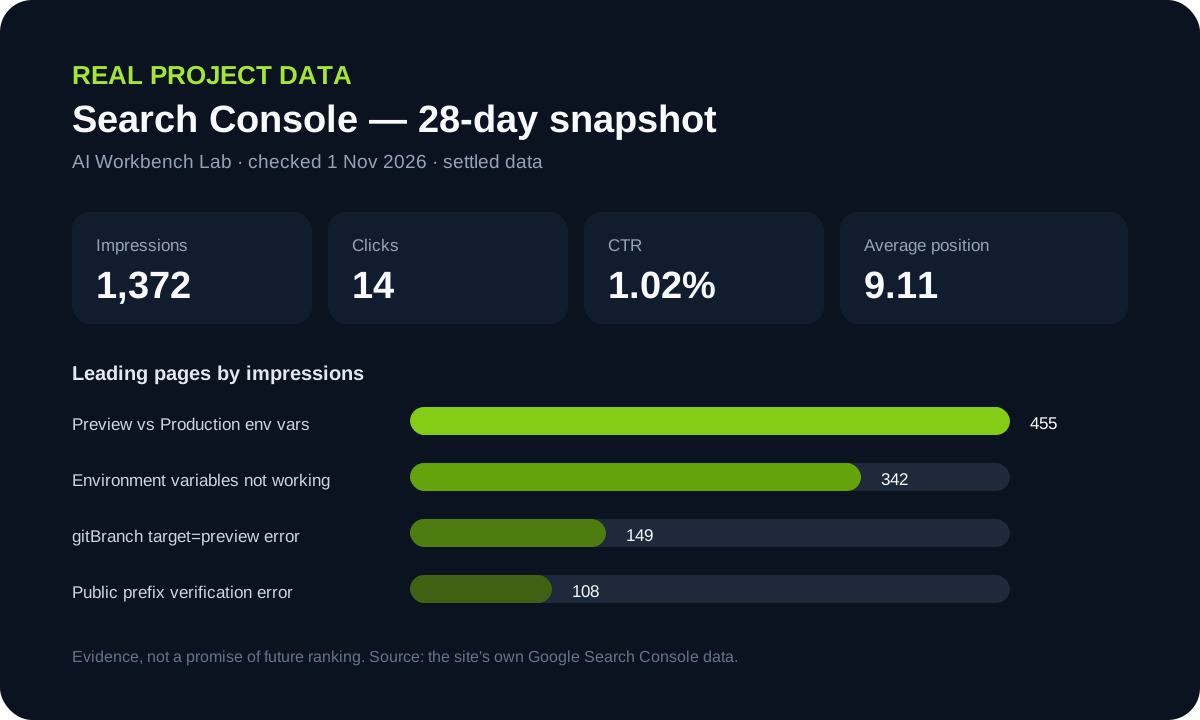
Those numbers are not a claim that the site has "won" SEO. They are evidence of what Google was already choosing to show.
That changed what I worked on next.
At one point, Vercel environment-variable articles started receiving most of the site's impressions.
Instead of deciding:
I should write more general AI articles.
I looked at the actual search queries.
Google was showing the site for specific Vercel error messages.
That led to focused troubleshooting articles for errors such as:
- Environment Variables with gitBranch can only be used with target=preview
- Failed to Verify the Project's Public Environment Variable Prefix
- Public Framework Prefix Cannot Use visibility: secret
Those articles were not created because a content calendar said "publish three Vercel posts."
They came from real search behavior.
That is an important part of how I use ChatGPT now.
I use AI to help interpret evidence.
I do not want AI inventing the evidence.
Where ChatGPT Sites fits in 2026
There is also a new option now.
OpenAI's current documentation says ChatGPT Sites can create, preview, publish, and share interactive websites and lightweight apps directly inside ChatGPT.
That means the boundary between planning and building is getting smaller.
For some projects, that may become the simplest path.
My own workflow is still deliberately more separated:
ChatGPT for planning and project reasoning
v0 for visual direction
Cursor for the codebase
GitHub for change control
Vercel for Preview and Production
I like that separation because I want to understand where each decision and change lives.
But I do not think there is one correct stack.
If ChatGPT Sites gives a project the right amount of control, it may replace several steps.
The principle I care about is not loyalty to a tool.
It is keeping the workflow understandable.
What I still decide myself
There are several things I do not want AI deciding without me.
The business goal
AI can help clarify it.
It cannot own it.
The audience
AI can suggest personas.
I still need to know who the real customer or user is.
Product scope
AI often makes it easy to add more.
I need to decide what should not be built.
Security boundaries
AI can explain authentication and permissions.
I still need to decide who should have access to what.
Whether a result is good enough
A working build is not the same as a useful product.
Whether the evidence supports the next move
Search data, user feedback, conversion behavior, and real project constraints matter more than a confident AI recommendation.
The prompt structure I use most often
I do not believe in one perfect prompt.
But this structure consistently helps me.
Context
This is a Next.js website for [audience]. It uses [relevant stack].
Goal
The purpose of this page or feature is [goal].
Current state
This is what currently works and what is wrong.
Constraints
Keep [working parts]. Do not change [protected parts].
Desired outcome
A successful result should do [specific behavior].
First action
Before changing anything, explain the likely cause or propose the smallest plan.
That structure is useful for content, design, coding, debugging, and SEO.
It is not magic.
It simply reduces guessing.
My current end-to-end workflow
Today, a typical project looks something like this.
1. Idea
I start with the rough goal.
2. ChatGPT
I clarify audience, action, structure, scope, and risks.
3. Content and information architecture
I decide pages, hierarchy, messaging, and what can wait.
4. v0
I turn the defined structure into a visual direction.
5. Cursor
I work inside the real codebase and make controlled changes.
6. GitHub
I review and preserve the change history.
7. Supabase when needed
If the project needs users, data, authentication, or permissions, I add the backend intentionally.
8. Vercel
I test Preview before releasing to Production.
9. Search Console
I measure what Google is actually discovering after launch.
10. ChatGPT again
I use the evidence to decide what to improve next.
That loop is more useful to me than any single AI feature.
The real advantage is not that AI builds the website
The biggest change for me is not:
AI can build websites now.
The bigger change is:
I can move through unfamiliar decisions faster, test them sooner, and learn from the result.
That is why I no longer measure AI only by how many minutes it saves.
It changes what I am able to attempt.
It helps me understand systems I would have avoided.
It gives me a way to move from uncertainty to something concrete I can inspect.
But the responsibility does not disappear.
I still need to decide what matters.
I still need to review the work.
I still need to protect the data.
I still need to test the user experience.
And I still need to look at the evidence after launch.
That is what makes the workflow useful.
Official references I checked
For the current ChatGPT capabilities mentioned in this guide, I checked:
For the rest of my stack, see My AI Website Stack in 2026.
If you want the design handoff, read How to Use v0 Without Wasting Credits in 2026.
If you want the implementation workflow, read How to Use Cursor for Website Development in 2026.
And before launch, use the AI Website Launch Checklist.
Practical AI. Real Experience. Built in Public.